
Marketing
Google Ads for Ecommerce: Agency Support, Shopping Ads, Performance Max and Growth Strategy
On this page
- What Are Google Ads for Ecommerce?
- What Does a Google Ads Agency for Ecommerce Contribute?
- What Are Google Shopping Ads for Ecommerce?
- What Is Performance Max for Ecommerce?
- What Does a Google Ads Strategy for Ecommerce Need to Decide?
- What Should Ecommerce Brands Prioritise to Improve Google Ads Growth?
Google Ads for ecommerce grows online store sales through agency support, Google Shopping Ads, Performance Max and a Google Ads strategy built on conversion value. Google Ads feeds the Ecommerce Engine's Traffic section with active buyers.
Shopping Ads and Performance Max turn product data into paid product visibility. Strategy then sets how bidding, tracking, margins and incrementality shape spend. Results depend on purchase tracking, product eligibility and the conversion value each sale records.
What Are Google Ads for Ecommerce?
Google Ads for ecommerce is paid advertising on Google that turns shopper searches and product visibility into recorded purchases, measured through return on ad spend (ROAS), delivered through Search, Shopping and Performance Max, and checked through an ecommerce Google Ads audit. Within ecommerce marketing, Google Ads is the paid search and product advertising channel. That channel feeds the Ecommerce Engine's Traffic section with active buyers.
Google Ads records each online purchase as a conversion action, a tracked step in the customer journey. The Google tag on the order confirmation page sends each order's revenue to Google Ads as conversion value and files the sale under the Purchase conversion goal. Campaign reports then show each campaign's purchases and conversion value alongside its ad spend, and dividing conversion value by spend gives the campaign's ROAS.
How Is Ecommerce Google Ads Revenue Efficiency Measured?
Return on ad spend (ROAS) measures ecommerce Google Ads revenue efficiency by dividing recorded conversion value by advertising cost. Google Ads calculates ROAS for every campaign so that you can compare efficiency directly.
The calculation multiplies the result by 100 to give a percentage:
ROAS = conversion value ÷ advertising cost × 100%
A ROAS of 500% returns five times the ad spend in sales. For example, £5 in conversion value from £1 in ad spend equals 500%. ROAS reflects recorded sales value, so it measures revenue, not profit. Two products with the same ROAS therefore return different profit when margins differ. The ratio also depends on accurate conversion values inside Google Ads.
How Do Google Search Ads, Shopping Ads and Performance Max Differ for Ecommerce?
Google Search ads match text ads to the keywords shoppers type, Google Shopping ads match product listings built from Merchant Centre data to shopper queries, and Performance Max uses advertiser goals and inputs to serve ads across Google's channels. Merchant Centre is Google's platform that stores the product data behind Shopping ads.
Keywords, feed data and advertiser goals therefore need separate diagnostic questions when sales fall:
| Advertising system | Matching principle | Ecommerce role | Main diagnostic question |
|---|---|---|---|
| Search ads | Keywords that shoppers type | Captures existing keyword demand | Do the keywords bring buyers who purchase? |
| Shopping ads | Product data matched to shopper queries | Shows image and price before the click | Which products are eligible and visible? |
| Performance Max | Advertiser goals, assets and product data | Automates delivery toward a conversion goal | Which channels absorb spend, and what does each return? |
What Does an Ecommerce Google Ads Audit Diagnose?
An ecommerce Google Ads audit diagnoses whether a sales problem stems from account governance, product visibility, campaign delivery, measurement, or commercial value.
Each of the four diagnostic areas answers its own business question about the account:
| Diagnostic area | Business question | Typical signal |
|---|---|---|
| Account governance | Who controls and manages the Google Ads account? | The retailer lacks admin access or billing ownership |
| Product visibility | Which products can serve in ads? | Best-selling products receive no impressions |
| Campaign delivery | Where do budget and impressions go? | Spend concentrates on a small set of products or channels |
| Measurement and commercial value | Do recorded conversions reflect real, profitable sales? | Ad-reported sales differ from the store's order records. |
The same sales drop can start in any of the four diagnostic areas. For example, disapproved products and a broken purchase tag both cut reported sales. Higher ad spend fixes neither issue, so budget changes alone don't identify the cause of the sales drop. When none of the four typical signals appears, the growth bottleneck search moves to the Ecommerce Engine's Website & Branding Performance and Customer Retention sections.
What Does a Google Ads Agency for Ecommerce Contribute?
A Google Ads agency for ecommerce provides day-to-day campaign management and account governance through a linked manager account, with Google Partner credentials that confirm compliance with Google's programme requirements.
That campaign management sits within the Ecommerce Engine's Traffic section. Within that section, the agency manages advertising for the retailer's existing store. The retailer remains responsible for products, pricing, and the website itself. That division keeps commercial decisions with the business that owns the margin.
What Does Google Ads Management for Ecommerce Sites Include?
Google Ads management for ecommerce sites includes campaign operations, budget and bid oversight, conversion measurement checks, and reporting on cost, conversions, conversion value, and cost per conversion. The agency runs campaigns, adjusts budgets and bids, and verifies purchase tracking. The retailer controls products, margins, stock levels and the checkout experience. Google Ads reports conversions and conversion value in standard columns.
Each report pairs those columns with cost and cost per conversion:
| Metric | What it shows |
|---|---|
| Cost | Total advertising spend in the reporting period |
| Conversions | Purchases recorded after ad interactions |
| Conversion value | Sales value of those recorded purchases |
| Cost per conversion | Advertising cost divided by recorded conversions |
Platform-reported conversion value covers only sales that Google Ads attributes. Store revenue, by contrast, covers sales from every channel. Reports therefore show Google Ads results beside total store revenue.
How Can Ecommerce Brands Keep Control of Their Google Ads Account?
Ecommerce brands keep control of their Google Ads account by holding administrative access to their own client account while the agency manages it through a linked manager account. A manager account controls linked client accounts. Administrative access lets the retailer grant, change and remove other users' access.
An administrator on either the client account or the manager account can unlink the two accounts at any time. After unlinking, the client account keeps all its campaigns, history and performance data, so the retailer loses nothing built up while the agency managed it.
Ownership of the connected accounts matters as much as administrative access. Google Merchant Centre holds the product feed that Shopping and Performance Max campaigns run on, and Google Analytics 4 holds the store's sales and visitor data. Retailers who own both accounts keep their product listings and sales tracking running when they switch agencies.
What Do Google Partner Credentials Show About an Ecommerce Google Ads Agency?
Google Partner credentials show that an agency's manager account meets Google's three programme requirements for performance, spend and certification. Meeting those requirements lets an agency display the Google Partners badge on its marketing. The badge therefore reflects activity across every client account the agency manages. One measure of that activity is the optimisation score, Google's estimate of an account's performance potential.
Google checks that score and the other two requirements every day:
- Performance: The agency's manager account holds an optimisation score of at least 70%.
- Spend: Managed accounts reach $10,000 USD in ad spend over 90 days.
- Certification: At least 50% of account strategists hold Google Ads certification.
What is the #1 thing holding back your ecommerce revenue?
Get an instant PDF audit powered by The Ecommerce Engine™ methodology, refined through five years of research and development.
What Are Google Shopping Ads for Ecommerce?
Google Shopping Ads for ecommerce are product ads built from Merchant Centre data, served based on each product's eligibility status, and measured through product-level reporting. Google Shopping Ads for ecommerce show buyers a product's picture and price in search. Product data quality decides which searches each product can match. Accurate data therefore brings more qualified visitors into the Engine's Traffic section. Weak data, by contrast, hides products from buyers already searching for them.
How Do Google Shopping Ads Work for Ecommerce?
Google Shopping ads work by turning Merchant Centre product data into ads that show a product image, title, price and store name before a shopper clicks. Merchant Centre builds each Shopping ad from the product feed information the retailer submits. The ad's image, title and price let shoppers judge relevance before visiting the store.
The image, title and price sit among six core product attributes that each Shopping ad depends on:
- id: A unique identifier that separates each product in the feed.
- title: The product name that matches the item to shopper searches.
- link: The landing page URL where shoppers complete the purchase.
- image_link: The main product image that appears in the Shopping ad.
- price: The selling price and currency that the ad displays.
- availability: The stock status that tells Google whether the product is available for sale.
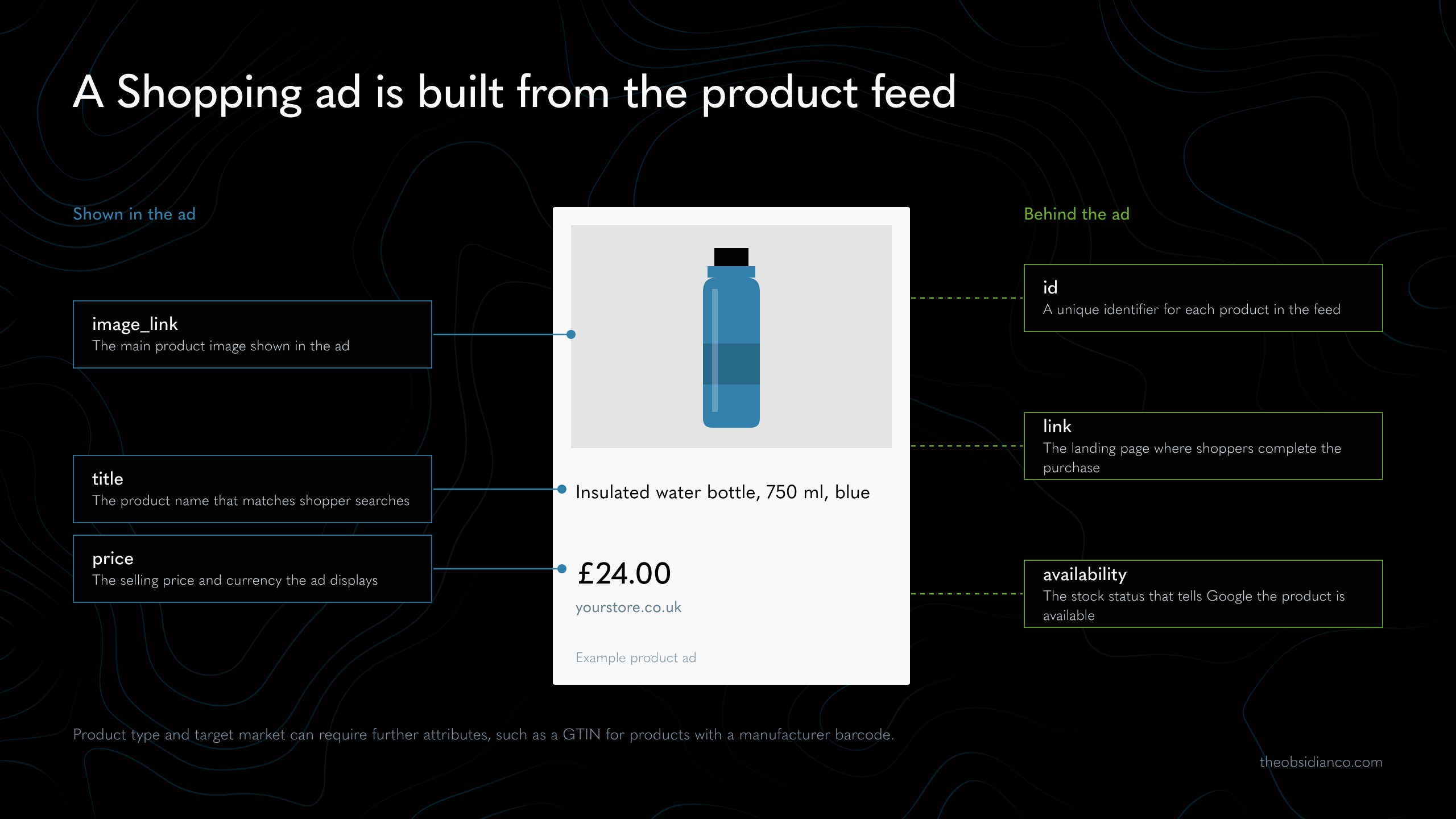
Product type and target market can require further attributes beyond those six. For example, products with a manufacturer barcode need a global trade item number (GTIN).
Which Google Shopping Eligibility States Signal Lost Ecommerce Visibility?
The Eligible (limited) and Not eligible states in Google Shopping product diagnostics signal lost ecommerce visibility, because Eligible (limited) products reach fewer searches and Not eligible products cannot show in ads, while Eligible products serve as intended. Google Ads shows each product's state on the Diagnostics page:
| Status | Meaning | Ecommerce implication |
|---|---|---|
| Eligible | The product is active and serves as intended | The product competes for impressions and sales |
| Eligible (limited) | The product meets policy but performs with limits | The product reaches fewer searches |
| Not eligible | The product cannot show in ads | The product earns no paid sales |
Google crawls landing pages to check feed data, which can make products not eligible. A price or availability difference between the feed and the page can cause Google to disapprove the product.
The availability attribute accepts four values: in_stock, out_of_stock, preorder, and backorder. An out-of-stock product shows as Not eligible in Google Ads diagnostics.
What Can Ecommerce Brands Learn From Google Shopping Product Reporting?
Google Shopping product reporting shows which products earn impressions, clicks, cost and conversions across the Google Ads campaign types linked to Merchant Centre. Google expanded reporting across more campaign types in June 2026. Reports now cover every Performance Max network plus Video, App and Demand Gen campaigns. Earlier metrics covered only Standard Shopping and Performance Max on Search networks. The expansion caused a one-time rise in Performance Max product metrics.
Product-level data separates catalogue coverage from campaign totals. A strong campaign total can hide products that receive no impressions. The report shows which products absorb spend and which receive none. Unadvertised best-sellers then point to an eligibility or campaign structure problem.
What Is Performance Max for Ecommerce?
Performance Max for ecommerce is an automated Google Ads campaign type that serves ads across six Google channels, uses product data, creative assets and audience signals as inputs, and competes with Standard Shopping through Ad Rank. Performance Max for ecommerce automates where product and creative ads appear across Google. The campaign runs alongside Search and Standard Shopping campaigns. Automation shifts control from manual settings to the retailer's inputs.
Where Can Ecommerce Performance Max Ads Appear?
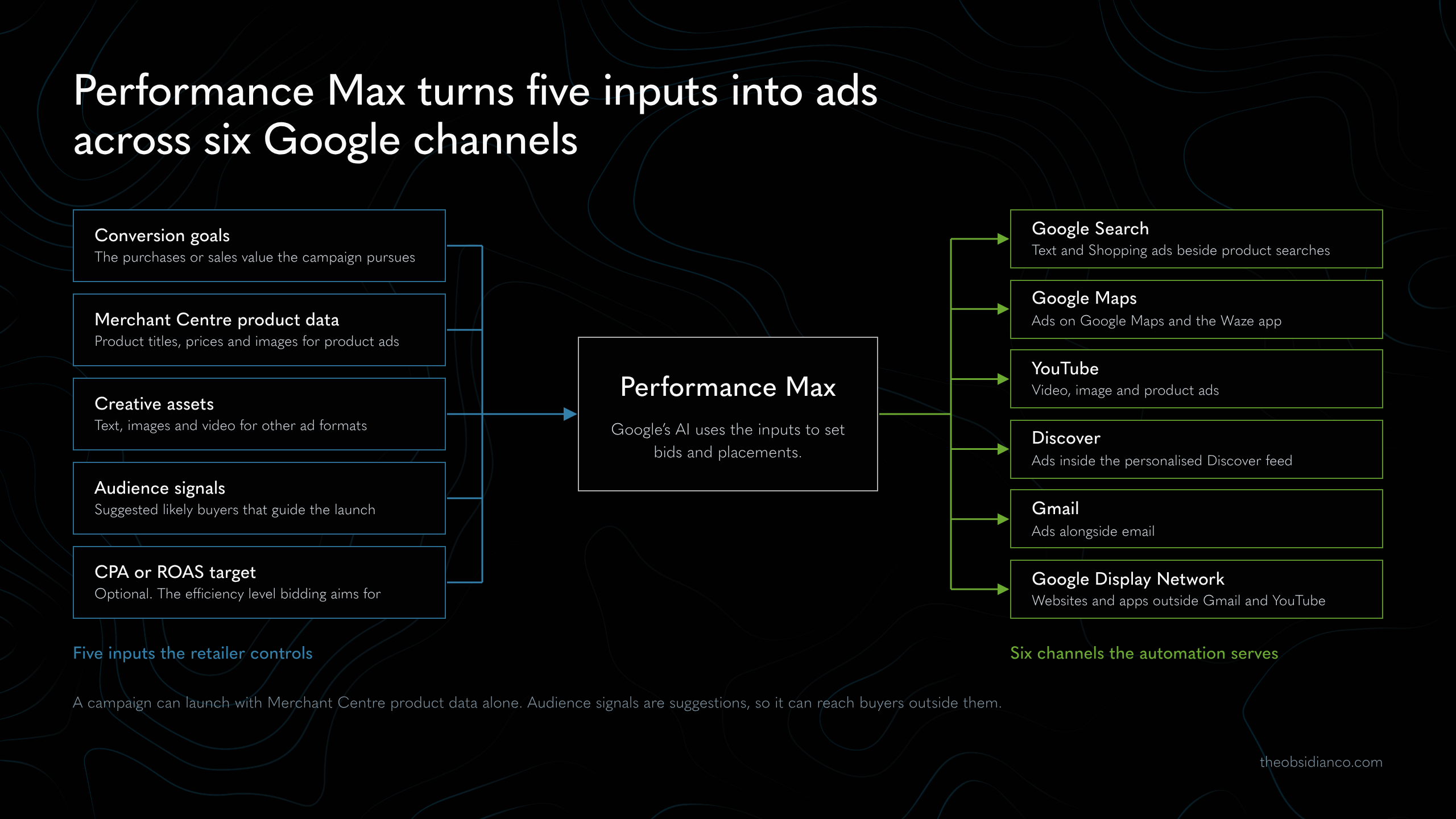
Ecommerce Performance Max ads can appear on Google Search, Google Maps, YouTube, Discover, Gmail and the Google Display Network. Each of those six channels reaches buyers in a different context:
- Google Search: Text and Shopping ads appear beside results for active product searches.
- Google Maps: Ads run on Google Maps and the Waze navigation app.
- YouTube: Video, image and product ads reach viewers watching YouTube content.
- Discover: Ads appear inside Google's personalised Discover content feed.
- Gmail: Ads run inside users' Gmail accounts alongside their email.
- Google Display Network: Ads reach websites and apps outside Gmail and YouTube.
The channel performance report shows clicks, cost, and conversions per channel, including Search partners. The report also separates ads using product data from video ads.
Which Inputs Inform Performance Max Ecommerce Campaigns?
Performance Max ecommerce campaigns draw on five inputs: conversion goals, Merchant Centre product data, creative assets, audience signals and an optional cost per action (CPA) or ROAS target. AI uses these inputs to set bids and placements. Each input shapes those bids and placements through a separate role:
| Input | Role in the campaign |
|---|---|
| Conversion goals | Define the purchases or sales value the campaign pursues |
| Merchant Centre product data | Supplies product titles, prices and images for product ads |
| Creative assets | Provide text, images and video for non-product ad formats |
| Audience signals | Suggest likely buyers to guide automation at launch |
| CPA or ROAS target | Sets the efficiency level that bidding aims to reach |
With Merchant Centre product data alone, a campaign can launch without any creative assets. Audience signals then guide that launch as suggestions rather than fixed targeting rules. Performance Max can therefore reach buyers outside the signalled audiences.
How Does Performance Max Compare With Standard Shopping for Ecommerce?
Performance Max distributes product ads automatically across Google's channels toward a conversion goal, while Standard Shopping runs product ads with advertiser-set product groups and bids. The two campaign types differ across three practical dimensions:
| Campaign type | Delivery model | Advertiser control | Main diagnostic question |
|---|---|---|---|
| Performance Max | Automated delivery across six Google channels toward a conversion goal | Goals, targets, assets, audience signals and listing groups | Which channels and products absorb the spend? |
| Standard Shopping | Product ads on Shopping placements driven by advertiser settings | Product groups, bids and negative keywords | Which product groups earn sales at the set bids? |
Both campaign types can target the same products in one account. When targeting overlaps, the campaign with the highest Ad Rank serves. Ad Rank is Google's auction score, combining bid, ad quality, and auction context. Google calculates Ad Rank for each auction, so neither campaign type holds automatic priority.
What Does a Google Ads Strategy for Ecommerce Need to Decide?
An ecommerce Google Ads strategy must decide between volume and value bidding, how ecommerce tracking records purchases, how margins and stock shape spend, and how attributed sales compare with incremental growth. An ecommerce Google Ads strategy aligns those four choices with commercial objectives. Each choice changes what campaigns optimise for and how you interpret results. Strategy decisions therefore come before changing campaign settings.
How Do Volume and Value Bidding Serve Different Ecommerce Growth Goals?
Volume bidding supports ecommerce goals focused on more purchases, while value bidding supports goals focused on higher total sales value or profit. Smart Bidding is Google's automated bidding system that sets bids for each auction. Value-based bidding optimises toward the value each conversion brings.
The two strategy families compare across four dimensions:
| Goal | Strategy family | Optimised outcome | Commercial limitation |
|---|---|---|---|
| More purchases | Maximise conversions, Target CPA (cost per action) | Conversion volume, with or without a CPA target | Counts a low-value and a high-value order equally |
| Higher sales value or profit | Maximise conversion value, Target ROAS | Total conversion value, with or without a ROAS target | Depends on accurate conversion values for every order |
Google renamed the target-based strategies in June 2026. "Maximise conversions with a target CPA" now appears as Target CPA. "Maximise conversion value with a target ROAS" now appears as Target ROAS. The relabeling leaves the strategy's bidding unchanged.
How Does Ecommerce Tracking Affect a Google Ads Strategy?
Ecommerce tracking affects a Google Ads strategy by recording purchases and purchase values as primary conversion actions, which Smart Bidding then uses to set bids. Bidding uses a conversion action only under two conditions. The advertiser must set the action as primary within its conversion goal. The campaign must also use the goal that contains that primary action. Secondary actions remain observation-only and report in the All conv. column without steering bids.
Each primary purchase action can also record each sale's value. Transaction-specific values represent mixed-price catalogues more accurately than one static value. Checking those recorded purchases against store orders separates tracking faults from real sales declines:
| Signal | Business interpretation |
|---|---|
| Google Ads purchases fall while store orders hold steady | Tracking fault: the tag or goal setup stopped recording sales |
| Google Ads purchases and store orders fall together | Real fall in sales that needs a commercial diagnosis |
How Should an Ecommerce Google Ads Strategy Account for Margins and Inventory?
An ecommerce Google Ads strategy accounts for margins by valuing conversions based on profit contribution and for inventory by matching ad spend to available stock. Conversion values can represent sales revenue or profit margins. Target ROAS then maximises whichever value the retailer records.
An illustrative 400% ROAS across two products shows why margin matters:
- Product A: A £100 sale with a £10 margin costs £25 in ads, losing £15.
- Product B: A £60 sale with a £30 margin costs £15 in ads, earning £15.
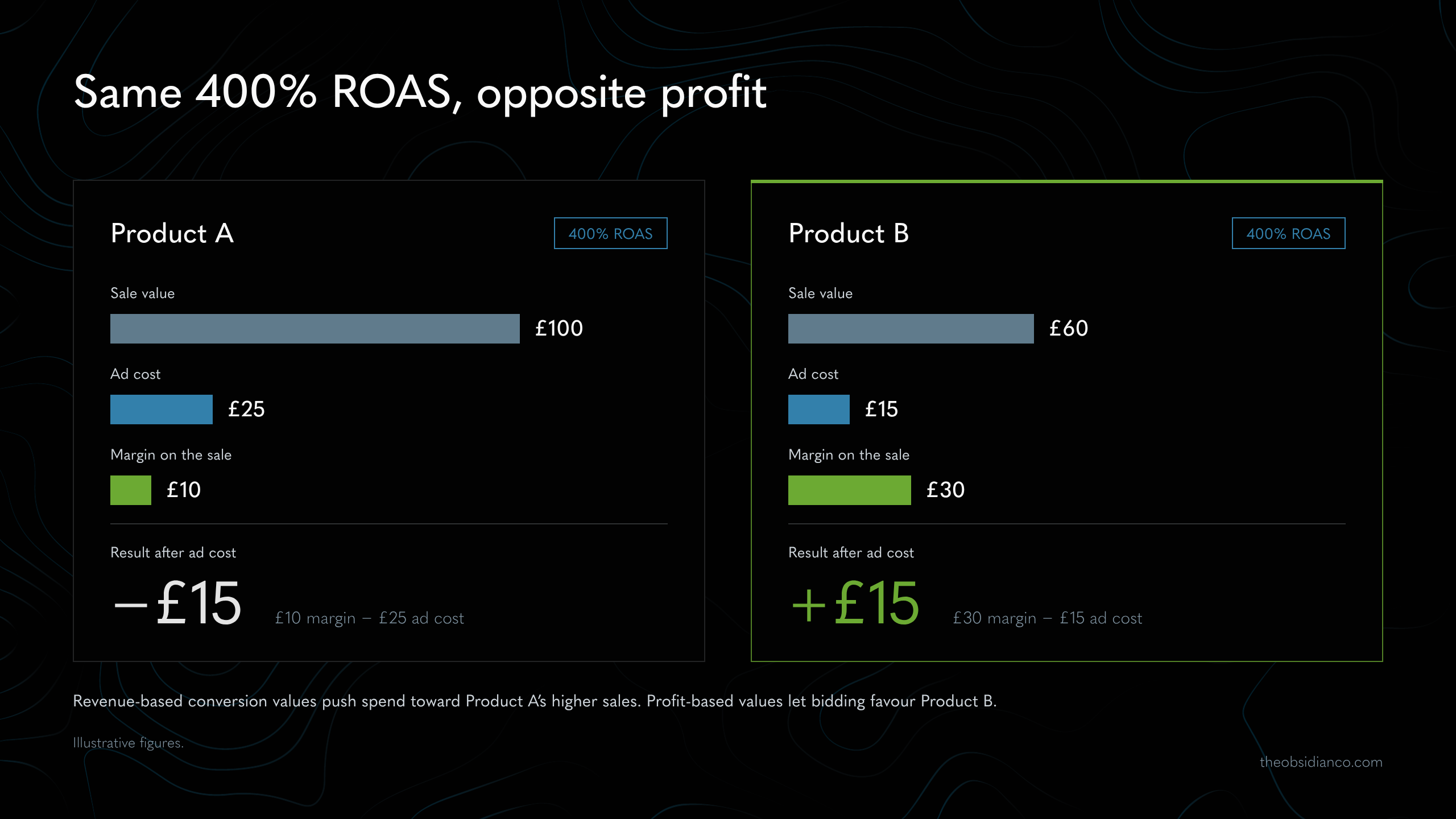
Profit-based conversion values let bidding automatically favour Product B. Revenue-based values, by contrast, push spend toward Product A's higher sales. Stock levels cap the sales any campaign can convert. Spend on a low-stock product buys demand the store cannot fill. The right ROAS target and budget therefore differ for every retailer.
How Can Ecommerce Google Ads Separate Attributed and Incremental Growth?
Ecommerce Google Ads separates attributed growth from incremental growth by comparing data-driven attribution credit with Conversion Lift results measured against a control group. Data-driven attribution is the default model for new conversion actions. The model assigns credit across ad interactions using the advertiser's own conversion data. Google recommends at least 200 conversions and 2,000 ad interactions within 30 days. That volume improves model accuracy, while eligibility for new conversion actions applies at any volume.
Conversion Lift measures incremental growth by splitting the audience into a treatment group and a control group. The treatment group sees the ads, while the control group does not. Incremental conversions equal treatment conversions minus control conversions. Retailers request a Conversion Lift study for those figures through a Google account representative.
Those incremental figures and attributed conversions answer different questions about the same campaign:
| Conversion type | What it measures | Method | Business use |
|---|---|---|---|
| Attributed conversions | Credit for sales that followed ad interactions | A data-driven model assigns credit across touchpoints | Day-to-day campaign and bidding decisions |
| Incremental conversions | Sales the advertising itself caused | A treatment group is compared with a control group | Budget and channel investment decisions |
What Should Ecommerce Brands Prioritise to Improve Google Ads Growth?
Ecommerce brands should prioritise reliable ecommerce tracking, product eligibility, clear campaign performance data and profit-based conversion value to improve Google Ads growth. Each priority isolates one source of failure inside Google Ads for ecommerce. Tracking and conversion value show whether reported sales match real, profitable orders. Product eligibility shows whether the catalogue can appear in Shopping and Performance Max. Campaign performance data then shows where spend goes and what each channel returns.
Account and agency problems, by contrast, sit in access, billing and reporting. Separating the two stops higher spend from hiding an unresolved bottleneck. Ecommerce growth from Google Ads therefore starts with the weakest of the four priorities. Stronger product eligibility and accurate conversion value then lift campaign performance.
Try Us Free for 4 Weeks. Up to $5,000 in Agency Fees, On Us.
Four weeks of agency work on us, with no commitment and no obligation to carry on. For ecommerce brands at $50K+ a month and $10K+ in ad spend.
Next month’s intake closes in00days00hours00minutes00seconds

Works on the content half of search: keyword research, page copy, blog articles and the words that turn a store’s visitors into buyers.
Writes about Technical SEO, Structured data, Site architecture
More articles
 MarketingEcommerce SEO: Benefits, Agency Support, Audit, Strategy, Technical, On-Page and Off-Page SEO, Platforms and MeasurementAlexander W. · 23 November 2026
 MarketingEcommerce Meta Ads: Agency, Facebook, Instagram and Ad CreativeAlexander W. · 23 November 2026
 MarketingEcommerce CRO: Conversion Metrics, Audits, Agency Support, UX, Landing Pages, Product Pages, Checkout, Site Search and MerchandisingAlexander W. · 23 November 2026